A basic prompt filter can fail after one small spelling change.
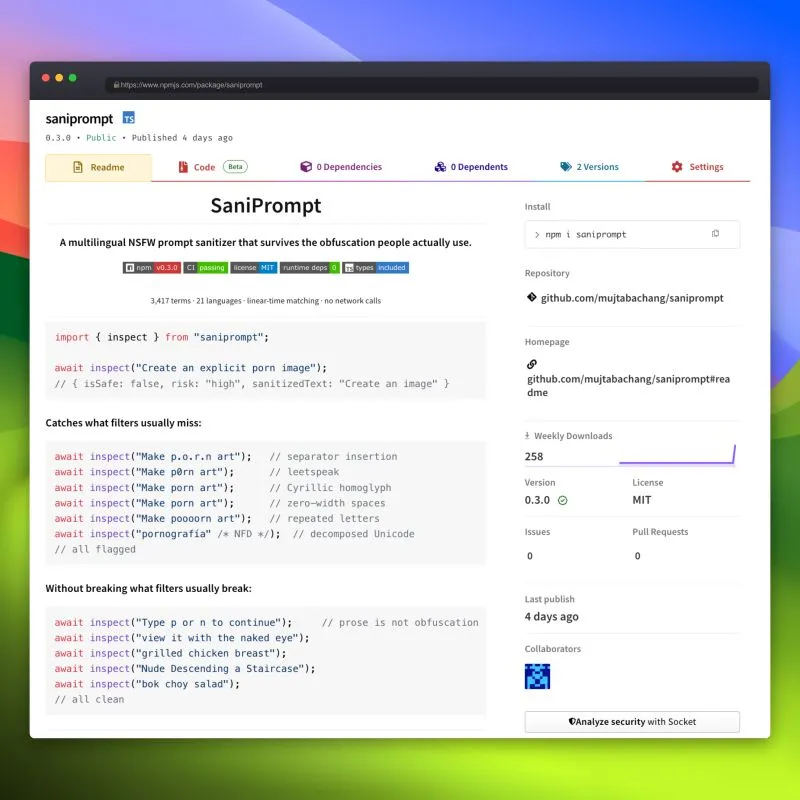
A filter that only looks for exact words can miss p0rn, p.o.r.n, a look-alike letter from another alphabet, hidden characters, or a word with repeated letters. I built SaniPrompt to catch these common tricks. It is my first published npm package.
Why I built SaniPrompt
SaniPrompt runs in Node.js and in the browser. It has no extra runtime packages, does not send prompts over the network, and includes 3,417 terms in 21 languages.
import { inspect } from "saniprompt";

const result = await inspect("Create an explicit porn image");

result.isSafe;        // false
result.risk;          // "high"
result.sanitizedText; // "Create an image"
Before checking a prompt, SaniPrompt handles several common tricks:
- dots, spaces, or other separators inside a word, such as
p.o.r.n - number substitutions, such as
p0rn - letters that look like letters from another alphabet
- hidden zero-width characters
- different Unicode forms of the same text
- stretched words, such as
pooorn - joined words and common word endings
The search stays fast as the word list grows. Its speed depends mostly on the length of the prompt, not the number of terms in the list.
It tries to avoid false alarms
Catching bad words is only half the job. A filter that blocks normal phrases is not very useful.
I spent a lot of time testing phrases that should stay clean:
naked eyechicken breastadult educationNude Descending a Staircasebok choy salad
The rules have levels. You can block explicit material but allow artistic nudity. You can also block slurs without blocking everyday swearing. The NSFW and profanity settings are separate.
There are four ways to handle a match: remove it, hide it with a mask, replace it with a placeholder, or report it without changing the original text.
import { inspect } from "saniprompt";

const { isSafe, risk } = await inspect(prompt, {
  strategy: "flag",
});

if (!isSafe) {
  return reject(risk);
}
For repeated checks, createSanitizer prepares custom rules once instead of rebuilding them every time. You can add your own word and regular-expression rules. The built-in checks cover NSFW, profanity, hate, violence, self-harm, illegal activity, prompt injection, personal information, and secrets.
It is not a complete safety system
Removing a word does not make the rest of a prompt safe. A prompt can describe an unsafe result without using any word in the filter. A word list also cannot understand intent or context.
I use SaniPrompt as a fast first check. For serious applications, combine it with a service that understands context, and reject unsafe prompts based on isSafe instead of trusting cleaned text.
The local part does not save prompts or call a service. If you add a moderation provider, that provider may receive the data.
Install it
npm install saniprompt
The package is open source and MIT licensed. You can find the source, tests, and development instructions on GitHub, or install it from npm.
I used AI a lot while building it. I still tested the results myself. I measured how many unsafe examples it caught, how many safe examples it left alone, and whether it continued to catch the same tricks after changes. There are still gaps, especially in the language-specific word lists.
This is my first npm package. If you use it, I would like to hear about a bypass or a false alarm that should become the next test. I also wrote about it in this LinkedIn post.